

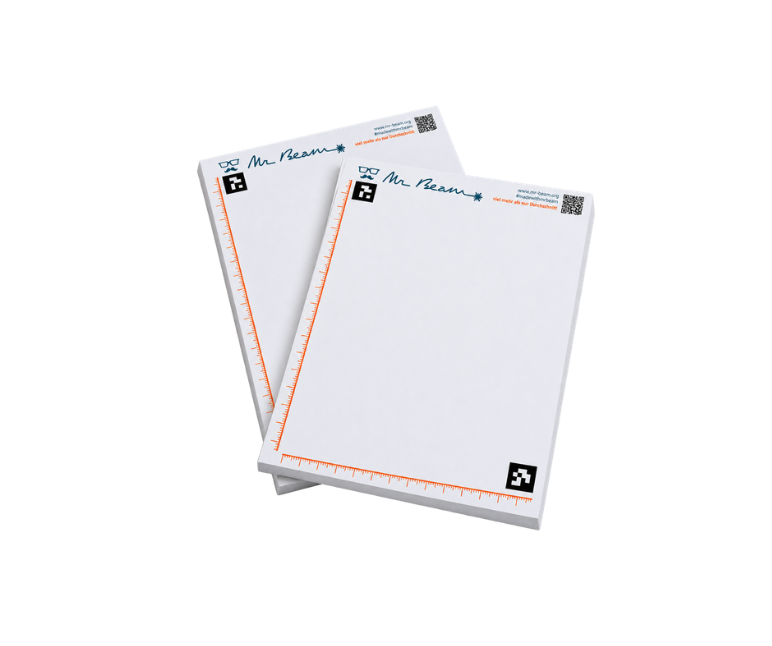
Mr Beam SketchBlock, A5, 2er Pack

Your choice:
Delivery time 1 - 3 days
Couldn't load pickup availability
Share


A strong community where you can find help and exchange ideas!

From the device to the accessories, the consumables and the inspection, you get everything coordinated with us and from a single source !

Made in Germany : You can always rely on quality and service!
Mr Beam SketchBlock A5 – Zeichnen. Einlegen. Lasern.
Vom Papier direkt zum Laserprojekt: Mit dem Mr Beam SketchBlock A5 verwandelst du Zeichnungen, Handschriften und kreative Ideen im Handumdrehen in digitale Laserdateien.
Einfach auf dem SketchBlock zeichnen oder schreiben, das Blatt in deinen Mr Beam legen und loslegen. Dank der Aruco-Marker erkennt die Kamera den SketchBlock automatisch und öffnet QuickExtract. Deine Zeichnung wird digitalisiert und kann anschließend direkt in BeamOS bearbeitet, graviert oder geschnitten werden.
Schwarz wird zur Gravur, farbige Linien können als Schneidkontur verwendet werden. So entstehen ganz ohne Grafikprogramm individuelle Laserprojekte direkt aus deinen eigenen Zeichnungen.
Perfekt für kreative Projekte
Ob Kinderzeichnungen, handgeschriebene Botschaften, Unterschriften oder eigene Skizzen – mit dem SketchBlock wird aus einer Idee auf Papier ein persönliches Laserprojekt.
💡 Tipp: Sammelt zum Beispiel Unterschriften oder persönliche Nachrichten auf einem SketchBlock und graviert sie anschließend gemeinsam auf ein Geschenk.
So einfach funktioniert's
-
Zeichnen: Motiv auf den SketchBlock zeichnen oder schreiben.
-
Einlegen: SketchBlock in den Mr Beam legen.
-
Digitalisieren: QuickExtract erkennt und übernimmt deine Zeichnung.
-
Anpassen: Kontur auswählen und das Motiv in BeamOS positionieren und skalieren.
-
Lasern: Gravur- oder Schneideinstellungen wählen und Laserjob starten.
Lieferumfang
-
2 × Mr Beam SketchBlock A5
Voraussetzungen
-
BeamOS 2.0
-
Softwareversion 2.7.0 „Edelweiß“ oder neuer
-
Installierte Aruco-Marker
Deine Idee. Deine Handschrift. Dein Laserprojekt.
Downloads for your Mr Beam!
Welcome to our download area – here you'll find helpful information, instructions, and files about your Mr Beam's hardware and software. By the way, some of this can also be found directly in the user interface once you've connected to your Mr Beam.
General information about Mr Beam: Data Sheet [x] & [xx]
Hardware Downloads
Laser Cutter Manual German: Download
Laser Head Cleaning Instructions
Quickstart Guide German: Download
Data Sheet Laser Cutter Mr Beam II dreamcut [S]: Download
Data Sheet Laser Cutter Mr Beam II dreamcut [x]: Download
Data Sheet Laser Cutter Mr Beam II dreamcut [xx]: Download
Data Sheet Air Filter: Download
Air Filter System Manual: Download
Air Filter III Manual: Download
Mr Beam Height Extension Manual: Download
Laser Safety: Download
Declaration of Conformity Mr Beam Laser Cutter: Download
Declaration of Conformity Mr Beam Air Filter System: Download
The Declaration of Conformity can also be found in the Operating Manual.
Here you can download our multilingual manuals
Software Downloads:
Please make sure you are always using the latest file!
Current Software Update: Download
IP Tool (USB): Download
Network Reset (USB): Download
WIFI Configuration (USB): Download
Stick to delete design files: Download
Design Backup Stick: Download
Manufacturer of Mr Beam Laser Cutters & Air Filter Systems and operator of the Mr Beam Design Store:
Mr Beam GmbH
Trappentreustr. 23
80339 Munich
Contact: hello@mr-beam.org
Can I return ordered products?
Consumers have a 14-day right of withdrawal. Please note that, for example, if you purchase a device, this means that it may only be used for testing purposes during the 14-day period. We reserve the right to charge for excessive loss of value. To test the Mr Beam, we recommend renting it in advance. If materials/filters/accessories have been demonstrably damaged during testing and trying out, we reserve the right to demand compensation
How much are the shipping costs?
Free shipping inside of Germany. If you come from another country, shipping will be calculated during checkout.
What is actually covered by the Mr Beam laser cutter's warranty and what is repaired?
The guarantee covers all repairs that arise from possible production or device errors. This applies to the mechanical components as well as all relevant components, safety devices and software. We must invoice for repairs resulting from handling errors or accidental damage by the customer - as this requires us to use additional and unscheduled working time and spare parts. If you have a problem with your Mr Beam, contact us via our ticket system.
You can find more information about repairs on ourrepair service landing pages.
Here you will find the instructions for packing your Mr Beam for return: Packaging instructions
Item number 910-00659
Mr Beam SketchBlock A5 – Zeichnen. Einlegen. Lasern.
Vom Papier direkt zum Laserprojekt: Mit dem Mr Beam SketchBlock A5 verwandelst du Zeichnungen, Handschriften und kreative Ideen im Handumdrehen in digitale Laserdateien.
Einfach auf dem SketchBlock zeichnen oder schreiben, das Blatt in deinen Mr Beam legen und loslegen. Dank der Aruco-Marker erkennt die Kamera den SketchBlock automatisch und öffnet QuickExtract. Deine Zeichnung wird digitalisiert und kann anschließend direkt in BeamOS bearbeitet, graviert oder geschnitten werden.
Schwarz wird zur Gravur, farbige Linien können als Schneidkontur verwendet werden. So entstehen ganz ohne Grafikprogramm individuelle Laserprojekte direkt aus deinen eigenen Zeichnungen.
Perfekt für kreative Projekte
Ob Kinderzeichnungen, handgeschriebene Botschaften, Unterschriften oder eigene Skizzen – mit dem SketchBlock wird aus einer Idee auf Papier ein persönliches Laserprojekt.
💡 Tipp: Sammelt zum Beispiel Unterschriften oder persönliche Nachrichten auf einem SketchBlock und graviert sie anschließend gemeinsam auf ein Geschenk.
So einfach funktioniert's
-
Zeichnen: Motiv auf den SketchBlock zeichnen oder schreiben.
-
Einlegen: SketchBlock in den Mr Beam legen.
-
Digitalisieren: QuickExtract erkennt und übernimmt deine Zeichnung.
-
Anpassen: Kontur auswählen und das Motiv in BeamOS positionieren und skalieren.
-
Lasern: Gravur- oder Schneideinstellungen wählen und Laserjob starten.
Lieferumfang
-
2 × Mr Beam SketchBlock A5
Voraussetzungen
-
BeamOS 2.0
-
Softwareversion 2.7.0 „Edelweiß“ oder neuer
-
Installierte Aruco-Marker
Deine Idee. Deine Handschrift. Dein Laserprojekt.
Downloads for your Mr Beam!
Welcome to our download area – here you'll find helpful information, instructions, and files about your Mr Beam's hardware and software. By the way, some of this can also be found directly in the user interface once you've connected to your Mr Beam.
General information about Mr Beam: Data Sheet [x] & [xx]
Hardware Downloads
Laser Cutter Manual German: Download
Laser Head Cleaning Instructions
Quickstart Guide German: Download
Data Sheet Laser Cutter Mr Beam II dreamcut [S]: Download
Data Sheet Laser Cutter Mr Beam II dreamcut [x]: Download
Data Sheet Laser Cutter Mr Beam II dreamcut [xx]: Download
Data Sheet Air Filter: Download
Air Filter System Manual: Download
Air Filter III Manual: Download
Mr Beam Height Extension Manual: Download
Laser Safety: Download
Declaration of Conformity Mr Beam Laser Cutter: Download
Declaration of Conformity Mr Beam Air Filter System: Download
The Declaration of Conformity can also be found in the Operating Manual.
Here you can download our multilingual manuals
Software Downloads:
Please make sure you are always using the latest file!
Current Software Update: Download
IP Tool (USB): Download
Network Reset (USB): Download
WIFI Configuration (USB): Download
Stick to delete design files: Download
Design Backup Stick: Download
Manufacturer of Mr Beam Laser Cutters & Air Filter Systems and operator of the Mr Beam Design Store:
Mr Beam GmbH
Trappentreustr. 23
80339 Munich
Contact: hello@mr-beam.org
Can I return ordered products?
Consumers have a 14-day right of withdrawal. Please note that, for example, if you purchase a device, this means that it may only be used for testing purposes during the 14-day period. We reserve the right to charge for excessive loss of value. To test the Mr Beam, we recommend renting it in advance. If materials/filters/accessories have been demonstrably damaged during testing and trying out, we reserve the right to demand compensation
How much are the shipping costs?
Free shipping inside of Germany. If you come from another country, shipping will be calculated during checkout.
What is actually covered by the Mr Beam laser cutter's warranty and what is repaired?
The guarantee covers all repairs that arise from possible production or device errors. This applies to the mechanical components as well as all relevant components, safety devices and software. We must invoice for repairs resulting from handling errors or accidental damage by the customer - as this requires us to use additional and unscheduled working time and spare parts. If you have a problem with your Mr Beam, contact us via our ticket system.
You can find more information about repairs on ourrepair service landing pages.
Here you will find the instructions for packing your Mr Beam for return: Packaging instructions